Once you have selected your system, it’s time to think about what it is you’re actually hoping to design and publish. It could be an adventure, a character option, a rules supplement, a setting, or something else entirely.
Whatever it is you want to write, any project will benefit from some planning and organization at the start. We have a number of tools at our disposal to accomplish such things.
Outlines
The first tool isn’t actually some piece of tech or software, but rather the humble outline. While it might seem obvious, it’s important to note just how useful it is when preparing to write something.
Ok, so I know that sounds boring and obvious, but it’s true! An outline will help you structure your ideas at a high level and then let you drill down into the details later on.
What exactly your outline needs, and needs to show, will depend on the type of product you’re making. Here are some suggested ideas based on common product types. You can start with these as a template, but make sure to change them to suit your needs.
New RPG System
- Introduction
- What is an RPG
- How is this RPG different from others
- Character Options
- Ancestries/Kin
- Classes
- Backgrounds
- Equipment
- Magic
- Game Rules
- Combat
- Roleplaying
- Exploration
- Setting
- Game Master Information
- Running the game
- Monsters/Enemies
- Treasure/Rewards
Character Options
- Introduction
- Discuss supplement theme, if any
- New/Modified Ancestries/species
- List each Ancestry Species
- New/Modified Classes
- List each Class
- New/Modified Backgrounds
- List each background
- New/Modified Equipment/Treasure
- List all equipment/treasure
- New/Modified Magic/powers
- List all magic/powers (spells, effects, etc.)
Adventure Content
- Introduction
- Background
- Adventure Summary
- Adventure Hooks
- Event(s)
- Setup
- Dramatic Situation
- Resolution
- Next steps
- Location(s)
- Description
- Interesting thing
- Environmental Storytelling
- Puzzle
- Trap
- NPC’s
- Ally’s
- Enemies
- Treasure/Rewards
Monster Compendiums
- Introduction
- Discuss supplement theme, if any
- Group Monsters – Options include:
- Similar Type
- Similar habitat
- Difficulty
- Alphabetical
- List each monster
- Name
- Stats
- Powers
- Ecology
- Interesting facts.
Again, these templates are meant to be used as inspiration. They will need to be modified based on the system you use, and the needs of your products. Use them as a jumping off point.
Now, we can get along just fine with pen-and-paper to setup our outlines, but we can also leverage some digital tools to make our lives a lot easier. These tools all can be accessed through standalone desktop apps on a computer, but also have mobile and web versions that allow you to create your outlines wherever you are and sync them across multiple platforms.
- Notion.so – Notion is a very popular workspace. It can be used to create personal wikis and documents, and it can be used for managing your RPG projects. It uses a “blocks” type structures which can be used to organize an outline through various headings, including collapsible headings, as well as bulleted lists. It can use a system of “backlinks” to connect data across multiple pages.

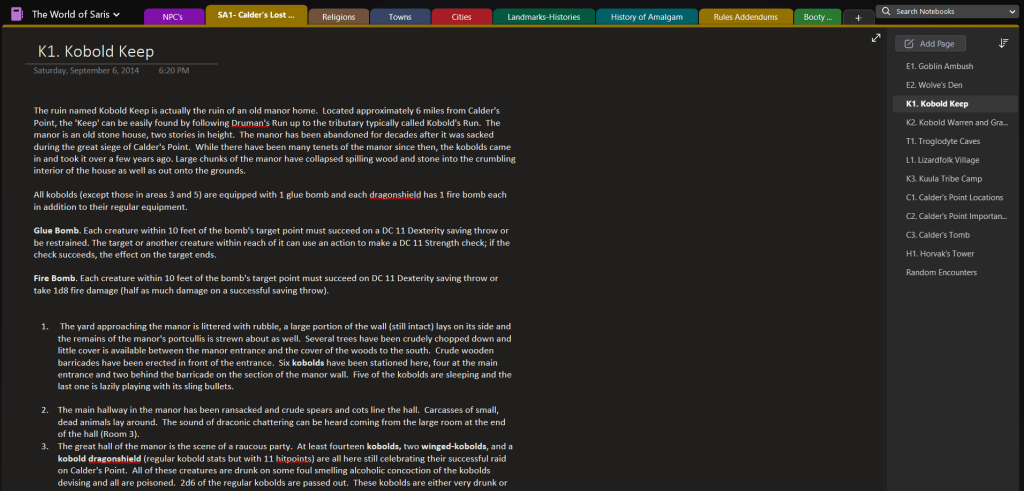
- OneNote – Similar to Notion, this Microsoft product can similarly be used to organize your project. It uses a container system starting with Notebooks that contain tabs or Sections. The Sections can be grouped together as well however you like. In each Section you can place text, images, and create bulleted lists with a heading hierarchy. Perfect for creating an outline. OneNote also uses backlinks to connect Sections.
- Obsidian – Another popular app for organizing and writing, Obsidian feels a little more bare bones than the previous options. If all you are looking to do is create an outline or write text, Obsidian is a great way to go.

Which of these outlining tools is right for you, will ultimately have to be your decision. They all have free tiers and paid tiers, with the paid tiers expanding their individual functionality.
I personally have used Notion the most, and would highly recommend it. Be advised getting text out of Notion can be bit tricky however, and a lot of the formatting can be lost. I used Notion to organize a lot of things in my life, not just my RPG designs. I have I’ve been using it to prepare and run my games thanks to Sly Flourish’s custom template.
Next Steps
The applications listed above can be used for both outlining and writing, but don’t represent a complete list of all available options. Desktop and mobile office software, like Microsoft Word, can be used for creating our outlines as well.
The advantage to using these apps instead of the ones above (which are a bit more focused on data management) is that when you begin writing your supplement there are options and templates that can be implemented to help get your text into a more useable format for final product development. We will look at using this next set of tools and how we can employ these word-processing programs for use designing and publishing our RPG’s in next weeks article.
Until then, good gaming!
-Mike

 CritFail Press
Leave a comment